
How the R8 Configuration Analyser Cut Our App Size by 20% and Boosted Startup Speed
A few days ago, I came across a blog post on the Android Developers Blog about how Tinder optimised their app using the R8 Configuration Analyzer. In my 8+ years of Android development experience, I had never heard of this tool before. This got me curious, so I started exploring what it does and how it works. The R8 Configuration Analyzer is a new tool available starting with Android Gradle Plugin (AGP) 9.3. It is essentially a Gradle task that analyses R8 configuration files (typically proguard-rules.pro and consumer rules) and provides insights into how each rule affects whether classes, fields, and methods are kept or removed during R8 optimisation. The Tinder case study builds on a previous post from a few months ago explaining how R8 made Kotlin Coroutines on Android 2x faster.
R8 Configuration Analyzer
The R8 Configuration Analyzer is available for projects using AGP 9.3 and above. It runs as a Gradle task formatted as :app:analyze<Variant>R8Config (for example, :app:analyzeReleaseR8Config or :app:analyzeDebugR8Config). If your project uses product flavours, you combine the build type and flavour name accordingly (such as :app:analyzeGithubReleaseR8Config). The interesting part is that running this task does not build the entire app. It only compiles classes and resources, stopping short of running full R8 optimisation and assembling the final AAB or APK which is time consuming.
When the Gradle task completes, it generates an HTML report showing how R8 keep rules affect the compiled classes. It displays percentage scores for how much of the app’s codebase R8 is allowed to shrink, optimise, and obfuscate. The higher the percentage, the better for the app’s size and runtime performance.
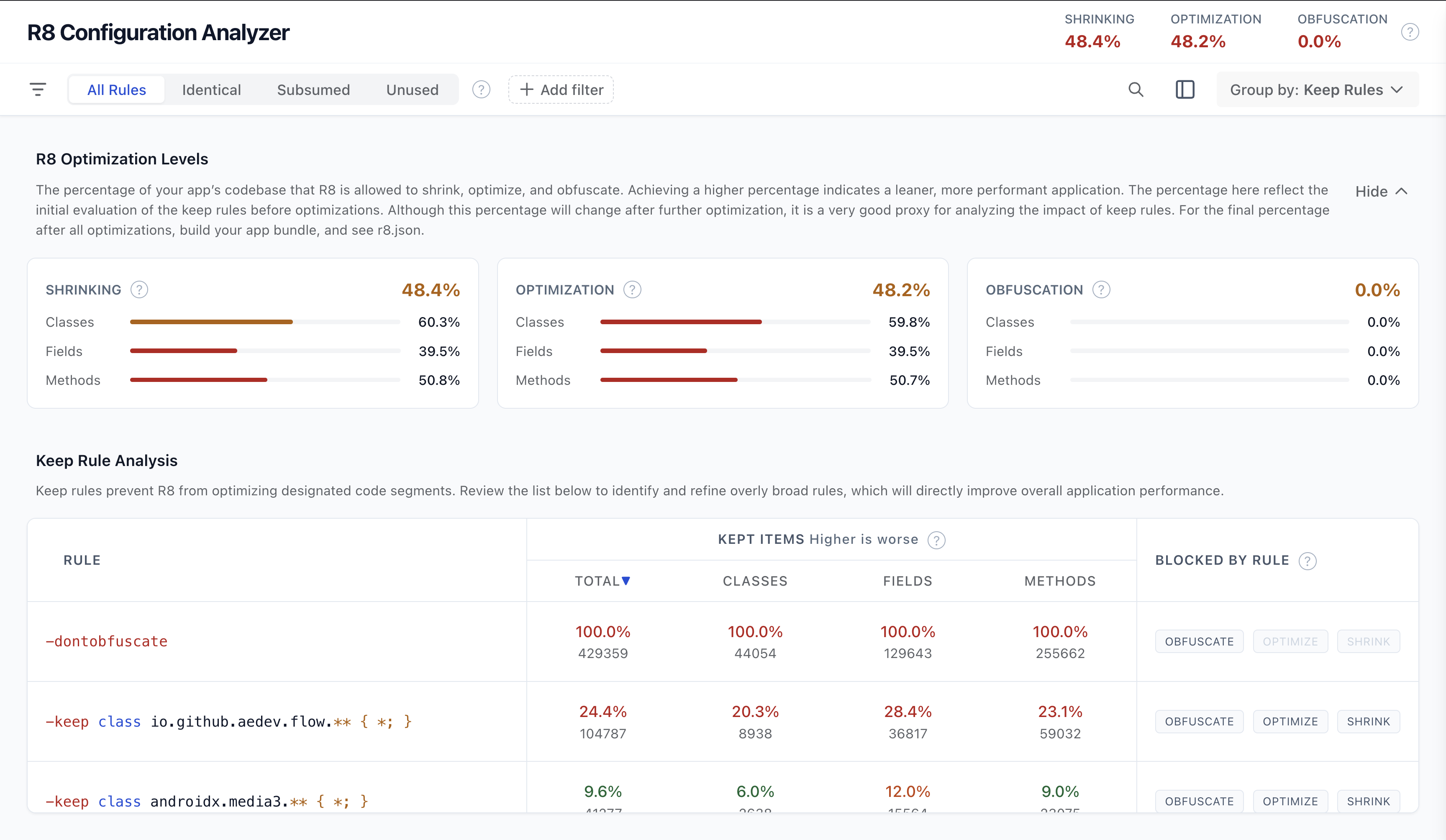
Usage in actual app
To test this out in practice, I picked an open-source app that I actively contribute to: Flow, a YouTube client reimagined for Android. Before making any optimisations, I ran ./gradlew :app:analyzeGithubReleaseR8Config to establish a baseline.
I studied the generated report and used the android-cli tool’s r8-analyzer agent skill to investigate potential optimisations. After the agent generated its analysis and recommendations, I asked it to optimise the configuration accordingly. Since Flow is an open-source project, code obfuscation isn’t necessary, so we use the -dontobfuscate flag. After going through a few rounds of iterative refinement with the AI agent to tighten overly broad keep rules, I verified and committed the code. I also used this opportunity to benchmark app startup times and submitted everything in a combined PR.
Pro tip: Always copy the generated HTML report outside the build/ directory so you don’t accidentally overwrite it when modifying keep rules and regenerating the report. Without the initial baseline report, it becomes difficult to compare whether your rule modifications changed anything.
After this optimisation, I was able to shave off ~20% of the APK size and achieve an ~11% faster warm startup.


Pros
- Generates a clear, shareable report showing the exact optimisation gains achieved.
- Provides much-needed visibility into what each ProGuard/R8 rule is actually doing.
- Fast execution because it avoids running full R8 or generating final package artifacts.
- Comes with an agent skill (
r8-analyzer) that speeds up investigation and fixes.
Cons
- The report does not estimate the exact byte-level APK size savings gained from each rule change.
- You cannot simulate rule adjustments directly in the report interface without updating the rules file and re-running the Gradle task.
- The “Group by Keep Rule File” view is somewhat cumbersome, as you have to inspect each rule file individually to review its available optimisations.
Conclusion
This tool is a big step in the right direction. Previously, Android developers lacked clear visibility into how individual keep rules impacted overall app optimisation. With the R8 Configuration Analyzer, we can easily see how each rule affects the codebase and fine-tune our configurations for leaner, faster apps.